ShopDreamUp AI ArtDreamUp
Deviation Actions
Daily Deviation
Daily Deviation
June 9, 2011
Group Notifier by `electricjonny
CATEGORY: deviantART Related / deviantART Skins & Scripts / Browser Scripts and Extensions:
The suggester states, "This is what you needed to stay up to date with your groups. Now that you know, Download it."
Works with Firefox© 4 and Chrome©! For those of us who have our Groups maxed out (3 for non-subscribers and 10 for those with Premium Memberships) this script is a time saver!
CATEGORY: deviantART Related / deviantART Skins & Scripts / Browser Scripts and Extensions:
The suggester states, "This is what you needed to stay up to date with your groups. Now that you know, Download it."
Works with Firefox© 4 and Chrome©! For those of us who have our Groups maxed out (3 for non-subscribers and 10 for those with Premium Memberships) this script is a time saver!
Featured by WDWParksGal
Suggested by TimberClipse


Suggested Deviants


Suggested Collections


You Might Like…


Featured in Groups





Badge Awards
Description
--
UPDATE - January 6th, 2016
It seems that when dA went back to the non-beta header a few weeks ago, they slightly changed how messages work, which broke this script. Turns out they removed the help desk portion of messages and that broke everything in this script. I've updated it so it works again, only having it make a sound and pop open on new messages might be a tad buggy (haven't fixed that bug yet). Install from the same link at the bottom
--
UPDATE - October 28th, 2015
This should now work better with the new navigation bar, including rotane's style to move things around up there. Install from the location down below
--
UPDATE - November 4th, 2011
This seems to put the icon under the top bar in Chrome. Not sure why, but I'll try to figure it out later.
--
UPDATE - August 10th, 2011
I made this script work a bit faster, so the time between the group messages icon showing up and fading in to 100 percent opacity is quicker. Install from the same links below to update.
--
UPDATE
The hovering version was made a lot better by Roamn, who gave me some code to keep it from opening and closing over and over.
--
UPDATE
I had a typo on the "Correspondances" tooltip when you hover over that icon, so I've updated it to fix that. Minor correction to fix a typo, but it's been updated as of Wednesday, June 8th, 2011, 5:44 PM EST.
--
Intro
You all may remember my old group messages script that would let you see all the messages in your groups, but that sort of broke when Firefox 4 was released. And it was just a messy script and didn't always work.
Well this is my update to that script, and it works pretty much the same way, without all the hassle that the other script had
--
How it works
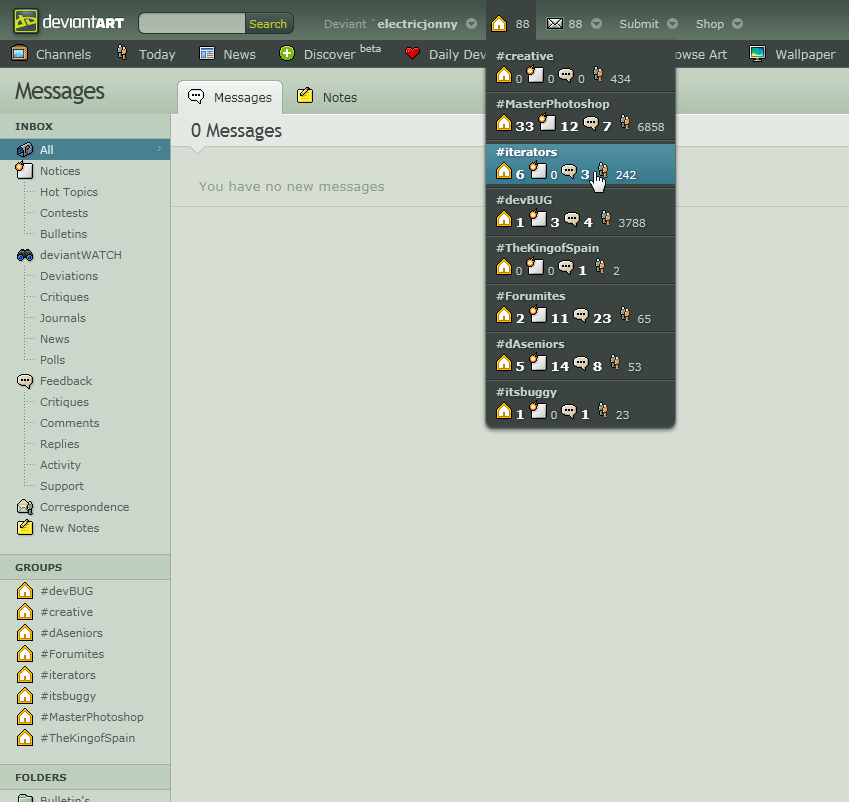
So as you can see from the screenshot, this will put in a icon at the top of your page telling you how many group messages you have. Group messages are counted as either notifications (notes or forum threads or whatever) or correspondence items (deviations or affiliates and things). It doesn't count comments, but you can still see any comments you have by just opening the menu up.
Then you can click (or hover) on the icon to open the menu you see in the screenshot. It will list all of your groups, and what message types each group has. This saves you from checking each group folder in your message centre manually to see the messages.
Then you can click on the groups listed there to be taken right to that group folder in your message centre so you can take care of the messages you may have.
If you don't have any messages, or you have any activity messages, the number will be lighter and smaller (since those aren't as important), but if you have any correspondence items, notices, or comments, the number will be white and bold, so you can easily see it.
--
IMPORTANT - Please read
This script has a few things to keep in mind. First and foremost, it may list more things than just your groups. If you have a custom folder you made that could be the name of a group, then it will be listed there (but still accurately say each number of correspondence, notices, comments, and activity). But if your custom folder name has a space in it, any special characters other than - or even a - at the start or end of the folder name, then it won't show up. So you may need to edit your folders and give them a name a group couldn't have. For example, I had a "llamas" custom folder (I was curious to see how many I got and from who years ago) but that would show up in the menu. So I made a new folder, named it "llamas-" (with the - at the end) and then moved all the messages in my old llamas folder to this new llamas- folder and deleted the llamas folder.
The group icon will slide in as soon as the script loads (as you know, user scripts load slightly after the page loads) but it will be partially transparent until it fetches all of your group messages, at which time it will fade up to 100 percent opacity. I had a version that wouldn't do anything, and then once it was all ready, it would pop in, but it was slightly distracting to have it pop in so late after the page loaded. So you won't be able to click (or hover) anything until the group icon is totally opaque. I've had a few times where it never became fully opaque, but a page reload fixed that.
When you hover over each group, you'll see it's a link to your group's folder. Most of the time. The way the HTML structure is, I wasn't able to make the whole "blue hover area" a link, so it's mostly just the group title and each type of message that is a link. But clicking anywhere on it will bring you to your group folder, so don't worry. You just may not be able to open the link in a new tab, depending on where you are hovering. And, this will act funny and open two tabs to your group message centre if you click the
Of course, this won't do much if you don't have group folders in your message centre (meaning you aren't an admin of any group) so don't install this unless you're an admin of any groups
--
This works in both Firefox (with Greasemonkey) and Chrome. Although if you use Chrome, you may want to check out this other extension, which adds a lot more functionality to messages in general.
Just open the zip and then drag the file into your browser.
--
As always, let me know how you like this, and if you have any suggestions or problems
tl;dr: Eh, read it anyway
UPDATE - January 6th, 2016
It seems that when dA went back to the non-beta header a few weeks ago, they slightly changed how messages work, which broke this script. Turns out they removed the help desk portion of messages and that broke everything in this script. I've updated it so it works again, only having it make a sound and pop open on new messages might be a tad buggy (haven't fixed that bug yet). Install from the same link at the bottom
--
UPDATE - October 28th, 2015
This should now work better with the new navigation bar, including rotane's style to move things around up there. Install from the location down below
--
UPDATE - November 4th, 2011
This seems to put the icon under the top bar in Chrome. Not sure why, but I'll try to figure it out later.
--
UPDATE - August 10th, 2011
I made this script work a bit faster, so the time between the group messages icon showing up and fading in to 100 percent opacity is quicker. Install from the same links below to update.
--
UPDATE
The hovering version was made a lot better by Roamn, who gave me some code to keep it from opening and closing over and over.
--
UPDATE
I had a typo on the "Correspondances" tooltip when you hover over that icon, so I've updated it to fix that. Minor correction to fix a typo, but it's been updated as of Wednesday, June 8th, 2011, 5:44 PM EST.
--
Intro
You all may remember my old group messages script that would let you see all the messages in your groups, but that sort of broke when Firefox 4 was released. And it was just a messy script and didn't always work.
Well this is my update to that script, and it works pretty much the same way, without all the hassle that the other script had
--
How it works
So as you can see from the screenshot, this will put in a
icon at the top of your page telling you how many group messages you have. Group messages are counted as either notifications (notes or forum threads or whatever) or correspondence items (deviations or affiliates and things). It doesn't count comments, but you can still see any comments you have by just opening the menu up.Then you can click (or hover) on the icon to open the menu you see in the screenshot. It will list all of your groups, and what message types each group has. This saves you from checking each group folder in your message centre manually to see the messages.
Then you can click on the groups listed there to be taken right to that group folder in your message centre so you can take care of the messages you may have.
If you don't have any messages, or you have any activity messages, the number will be lighter and smaller (since those aren't as important), but if you have any correspondence items, notices, or comments, the number will be white and bold, so you can easily see it.
--
IMPORTANT - Please read
This script has a few things to keep in mind. First and foremost, it may list more things than just your groups. If you have a custom folder you made that could be the name of a group, then it will be listed there (but still accurately say each number of correspondence, notices, comments, and activity). But if your custom folder name has a space in it, any special characters other than - or even a - at the start or end of the folder name, then it won't show up. So you may need to edit your folders and give them a name a group couldn't have. For example, I had a "llamas" custom folder (I was curious to see how many I got and from who years ago) but that would show up in the menu. So I made a new folder, named it "llamas-" (with the - at the end) and then moved all the messages in my old llamas folder to this new llamas- folder and deleted the llamas folder.
The group icon will slide in as soon as the script loads (as you know, user scripts load slightly after the page loads) but it will be partially transparent until it fetches all of your group messages, at which time it will fade up to 100 percent opacity. I had a version that wouldn't do anything, and then once it was all ready, it would pop in, but it was slightly distracting to have it pop in so late after the page loaded. So you won't be able to click (or hover) anything until the group icon is totally opaque. I've had a few times where it never became fully opaque, but a page reload fixed that.
When you hover over each group, you'll see it's a link to your group's folder. Most of the time. The way the HTML structure is, I wasn't able to make the whole "blue hover area" a link, so it's mostly just the group title and each type of message that is a link. But clicking anywhere on it will bring you to your group folder, so don't worry. You just may not be able to open the link in a new tab, depending on where you are hovering. And, this will act funny and open two tabs to your group message centre if you click the
a href while in the chat rooms, but I don't expect many people will find that a problem, and I don't really want to fix that Of course, this won't do much if you don't have group folders in your message centre (meaning you aren't an admin of any group) so don't install this unless you're an admin of any groups
--
To install
This works in both Firefox (with Greasemonkey) and Chrome. Although if you use Chrome, you may want to check out this other extension, which adds a lot more functionality to messages in general.
Group Notifier.user
Just open the zip and then drag the file into your browser.
--
As always, let me know how you like this, and if you have any suggestions or problems
tl;dr: Eh, read it anyway
Image size
849x802px 75.19 KB
© 2011 - 2024 electricjonny
Comments364
Join the community to add your comment. Already a deviant? Log In

Don't mind me... Just awarding badges to random stuff for fun.